Restaurant revenue grows in three ways: more customers, more orders from each customer and a bigger bill on every order. Customer analytics shows you which of the three is holding you back and which customers to talk to. Automated campaigns then act on it for you: they win back regulars who have gone quiet, recover abandoned baskets, collect reviews that bring in new guests and reward your best customers for spending a little more. You set them up once, they run for every customer, and each one reports the revenue it brought in.
Key takeaways
- Restaurant revenue is customers × order frequency × average order value. Small gains on all three multiply.
- Customer analytics splits your list into new, occasional, regular and loyal customers, so every offer goes to the people it can actually change.
- Ready-made campaign templates cover the moments that matter most: lapsed customers, abandoned carts, reviews, birthdays, big spenders and announcements.
- Multi-stage journeys move from email to SMS to WhatsApp and stop as soon as the customer comes back, so nobody is over-messaged.
- Revenue is attributed to every campaign, so you keep what works and drop what doesn't.
The three numbers that decide your revenue
Every pound your restaurant takes online comes from one simple formula:
Revenue = number of customers × orders per customer × average order value
Most restaurant marketing only works on the first number. Flyers, paid ads and marketplace listings all go after new customers. They matter, but new customers are the most expensive ones to win and the least likely to stay.
The other two numbers are usually cheaper to move and they compound. A 10% improvement on each of the three does not add up to 30% more revenue. It multiplies to about 33%, and you build it from the customers you already have.
The tools that move those numbers already sit in your Order Tiger dashboard: Customer Analytics under Analytics & Insights, and Campaigns under Marketing. Here is how each one works and which number it moves.
Customer analytics: know who is actually buying
You can't market well to a list you don't understand. The Customer Analytics screen gives you that picture for any day, week, month or year.
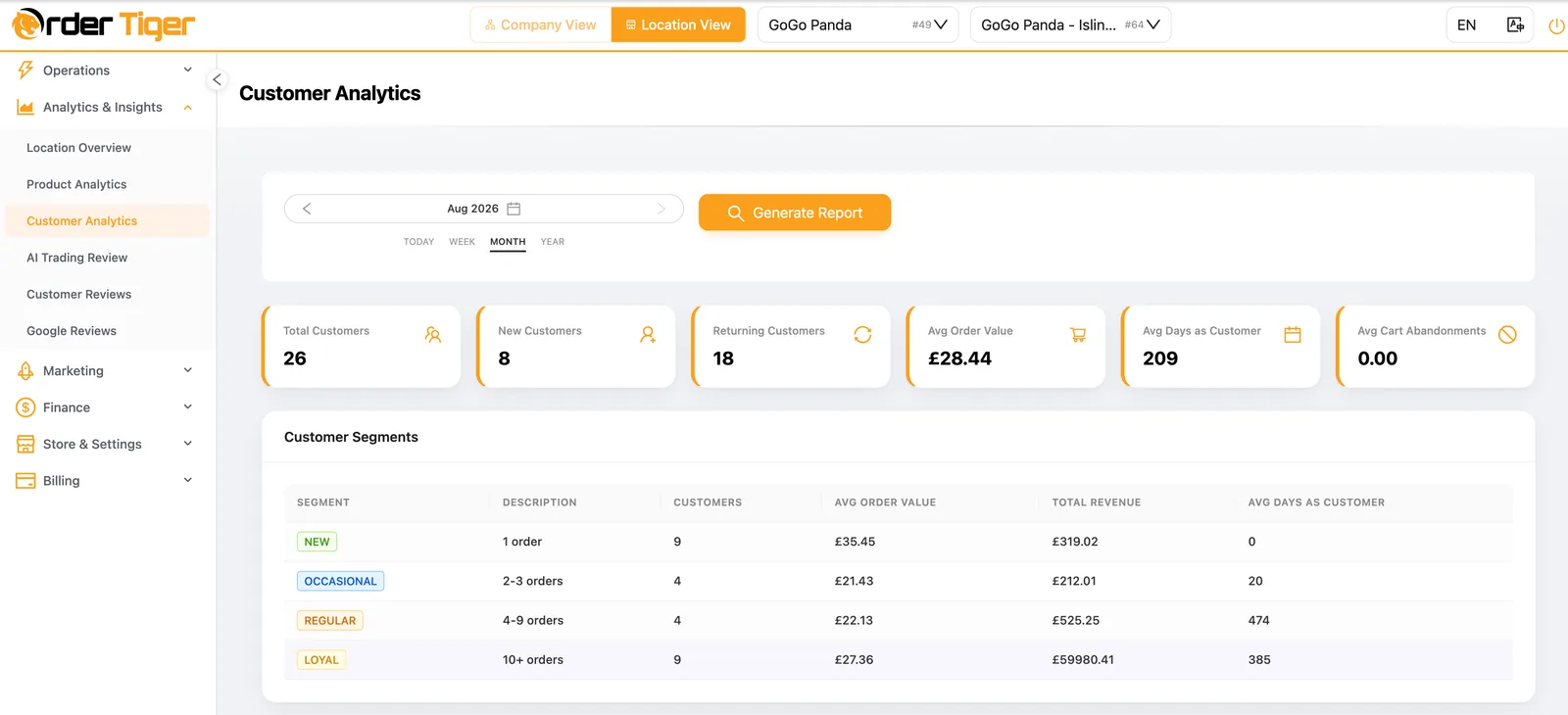
The top row answers the questions owners ask most:
- Total, new and returning customers. Are you growing your base, or living off the same faces? A healthy month has both.
- Average order value. The number every upsell, bundle and spend threshold is trying to raise.
- Average days as a customer. How long people stay with you. If this goes up, retention is working.
- Average cart abandonments. Revenue that was nearly yours. This is the easiest money to recover.
Underneath, the customer segments table splits everyone by how often they order:
| Segment | Who they are | What to do with them |
|---|---|---|
| New | 1 order | Make the second order the obvious next step: a thank-you, a review request and a small reason to return. |
| Occasional | 2 to 3 orders | Build the habit with loyalty points and timely reminders, before they drift back to a marketplace. |
| Regular | 4 to 9 orders | Protect them. Watch for the moment they go quiet and trigger a win-back straight away. |
| Loyal | 10+ orders | Thank them and raise the bill: spend-based rewards, new dishes first and birthday treats. |
For every segment you also see the average order value, the total revenue and how long they have been customers. That is where the real decisions come from. When your loyal customers spend more per order and bring in most of the revenue, the fastest growth lever is moving occasional customers up a segment, not chasing strangers. When new customers have a high order value but a low return rate, your first-order experience is fine and your follow-up is missing.
Analytics tells you what to fix. Campaigns do the fixing.
Campaign templates that run themselves
Most restaurants know they should send a win-back email or ask for a review. They just never have the time. Under Marketing → Campaigns & Content → Campaigns you start from a template, change the details and switch it on.
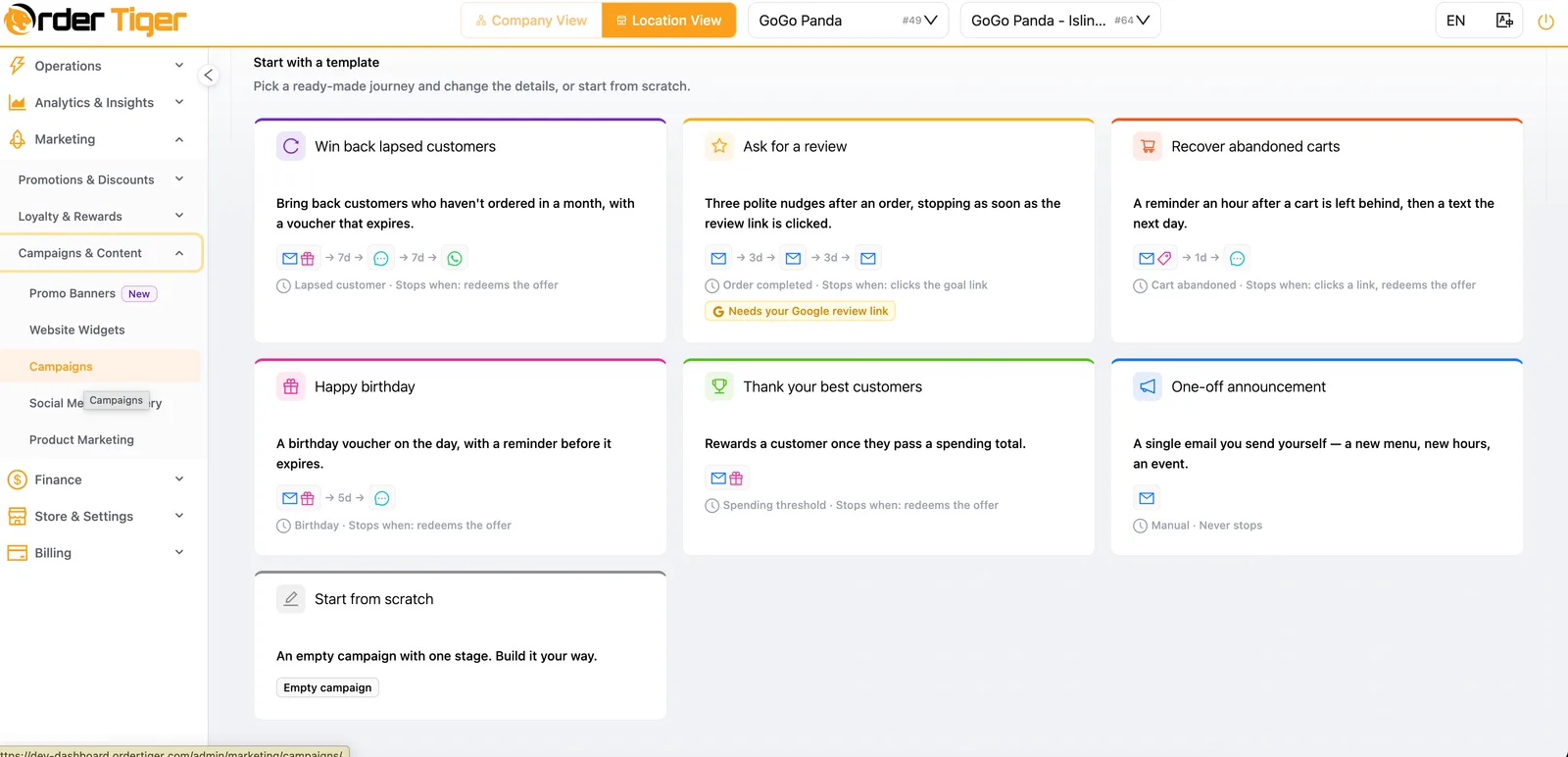
Every template is a full journey, not a single message. Each one has three parts:
- A trigger: the moment that starts it, such as an order completed, a cart abandoned, a birthday or a spending total reached.
- Stages: a sequence of messages by email, SMS or WhatsApp, spaced out over days, with an optional voucher attached.
- A stop goal: the action that ends the journey, such as redeeming the offer or clicking the review link. Once the customer does what you wanted, the messages stop.
The stop goal is what makes automation feel personal rather than spammy. A customer who comes back after the first email never gets the second one.
How each campaign grows your sales
1. Win back lapsed customers: more orders per customer
This is the highest-value campaign most restaurants are not running. Customers rarely leave because of a bad meal. They just stop thinking of you.
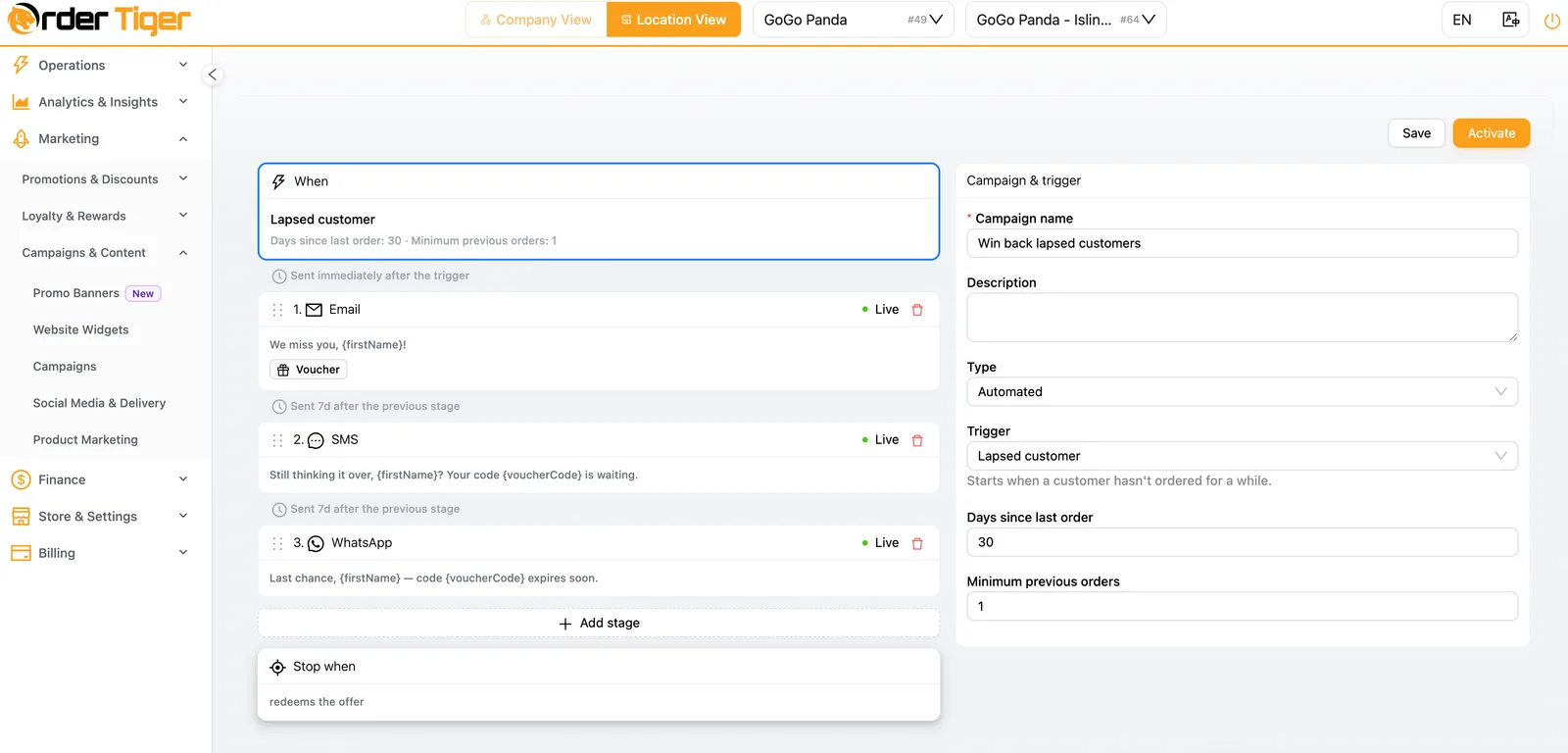
The win-back journey starts automatically when a customer with at least one previous order has not ordered for 30 days. You can change both numbers.
- Day 0, email: "We miss you, {firstName}!" with a voucher attached.
- Day 7, SMS: "Still thinking it over, {firstName}? Your code {voucherCode} is waiting."
- Day 14, WhatsApp: "Last chance, {firstName}: code {voucherCode} expires soon."
Each step uses a different channel, so the message reaches people who ignore email. The voucher expires, which gives them a reason to act now. And the journey stops the moment they redeem it.
Which number it moves: orders per customer and average days as a customer. Every regular you keep is worth far more than a new customer you have to win from scratch. For a two-step version that starts within 48 hours of the first order, see First Order to Loyal Regular.
2. Recover abandoned carts: sales you nearly had
A customer who builds a basket and leaves has already chosen what they want. They just didn't finish. The abandoned cart template sends an email reminder (with an optional discount) an hour after the cart is left, then a text the next day. It stops when they click through or redeem the offer.
Which number it moves: total sales, straight away. These customers are already warm, so a small reminder often converts. Keep an eye on average cart abandonments in Customer Analytics to see the effect.
3. Ask for a review: more new customers
Nothing brings a new customer through the door like a stranger saying the food was great. The review template sends three polite nudges after an order is completed, three days apart, and stops as soon as the review link is clicked. Connect your Google review link and every happy customer becomes a public recommendation.
Which number it moves: customer base. More recent, positive Google reviews mean better local search visibility and more first orders. You can manage the replies from the same dashboard with Order Tiger Reviews.
4. Happy birthday: frequency and bigger orders
A birthday voucher arrives on the day, with a reminder a few days before it expires. Birthdays are rarely solo occasions. A free dessert or a discount often turns into a family order or a table of friends.
Which numbers it moves: orders per customer and average order value, from a message customers are actually happy to get.
5. Thank your best customers: higher average order value
This campaign rewards a customer automatically once they pass a spending total you choose. It works on two levels. Your loyal customers feel recognised, which keeps them loyal. And customers close to the threshold have a clear reason to add one more item to reach it.
Which number it moves: average order value and retention of your most valuable segment. It pairs well with the points, stamps and tiers in the loyalty programme.
6. One-off announcements: trial of new dishes
A new menu, new opening hours, a seasonal special or an event. The announcement template is a single email you send yourself, whenever you like. Send a new premium dish to your regular and loyal segments first and you raise the average order value with the customers most willing to try it.
And if none of the templates fits, Start from scratch gives you an empty campaign with one stage to build your own journey.
How to raise average order value with campaigns
Discounts can lower your average order value if you use them badly. Used well, they raise it. A few rules that work:
- Attach a minimum spend to vouchers. "£5 off orders over £30" lifts the basket. "£5 off" just lowers the price.
- Reward thresholds, not single orders. The "thank your best customers" journey makes customers aim for a total.
- Offer a free side or dessert rather than a cash discount. It feels generous, costs you less and gets customers used to a bigger order.
- Target by segment. Don't send a discount to loyal customers who would have paid full price anyway. Give them recognition and new dishes first.
- Combine with upsells at checkout. Campaigns bring customers back, and promotions plus menu and checkout upsells raise what they spend once they are there. Our guide to restaurant upselling strategies covers this in detail.
Then check the average order value for each segment in Customer Analytics month by month. That shows you whether your offers are growing the basket or just cutting the price.
How to grow your customer base
Growing your customer base is not only about winning first orders. It is about keeping them long enough to count. Analytics and campaigns help at both ends:
- Reviews bring in new customers. Automated review requests build a steady stream of fresh Google reviews.
- A faster second order keeps them. New customers who hear from you soon after their first order are far more likely to come back.
- Direct ordering keeps the data. Every customer who orders on your own website or app joins your list, not a marketplace's, so you can reach them again for free.
- Social media brings them to your channel. Pair campaigns with social media marketing that sends followers to your own ordering site.
Watch two numbers in Customer Analytics: new customers each month, and how many of them move from the New segment to Occasional. If the first number grows but the second doesn't, put your effort into follow-up rather than acquisition.
Measure what works and improve it
Marketing that can't be measured gets cut the first time money is tight. With Order Tiger, every campaign shows the orders and revenue it brought in, so you can see exactly what a win-back voucher costs and what it returns.
- Revenue per campaign: keep the journeys that pay for themselves and change the ones that don't.
- A/B testing: send two versions of a message to a split audience, then send the winner to everyone next time.
- Monthly review: on the Marketing Accelerator plan, our team plans the campaign calendar around your quiet periods and seasonal moments, writes the copy and reviews the numbers with you every month.
A worked example
To show how the three levers compound, take an illustrative restaurant with 1,000 active customers ordering 1.5 times a month at an average of £25. That is £37,500 a month.
| Lever | What drives it | Change |
|---|---|---|
| Customers | Review requests and faster follow-up on first orders | 1,000 → 1,100 (+10%) |
| Orders per customer | Win-back, birthday and abandoned cart journeys | 1.5 → 1.65 a month (+10%) |
| Average order value | Spend thresholds, minimum-spend vouchers and upsells | £25.00 → £27.50 (+10%) |
| Monthly revenue | All three together | £37,500 → £49,913 (+33%) |
These figures are an example, not a promise. Your results depend on your menu, your market and your starting point. The principle holds, though: modest, measurable gains on all three levers add up to far more than a big push on any one of them.
A 30-day plan to get started
- Week 1: read your numbers. Open Customer Analytics, pick last month and write down your new and returning customers, average order value, cart abandonments and the size of each segment.
- Week 2: switch on the essentials. Activate win back lapsed customers, recover abandoned carts and ask for a review. Add your Google review link.
- Week 3: add value-raising journeys. Set up happy birthday and thank your best customers, with a spending total a little above your current average.
- Week 4: review and adjust. Check revenue per campaign, compare segment sizes with week 1 and test a second version of your weakest message.
After that, the campaigns keep running on their own. Your job is to review the numbers once a month, or let our team do it for you.
Frequently asked questions
How can automated marketing increase restaurant sales?
Automated campaigns act on moments that normally go unnoticed: a regular who has not ordered for 30 days, a basket left at checkout, a birthday or a customer close to a spending milestone. Each journey sends the right message by email, SMS or WhatsApp at the right time, stops once the customer comes back, and reports the revenue it brought in.
How do campaigns increase average order value?
Attach a minimum spend to vouchers, reward customers once they pass a spending total, offer a free side or dessert instead of a cash discount, and send new premium dishes to your regular and loyal segments first. Customer Analytics then shows the average order value per segment, so you can see whether the basket is growing.
What is customer segmentation for restaurants?
Customer segmentation groups customers by behaviour. Order Tiger splits customers into new (1 order), occasional (2 to 3 orders), regular (4 to 9 orders) and loyal (10+ orders), with the average order value, total revenue and average days as a customer for each segment, so every offer goes to the people it can change.
Will automated campaigns spam my customers?
No. Every journey has a stop goal, such as redeeming the offer or clicking the review link. As soon as the customer does it, the remaining messages are cancelled. Segments also make sure each offer only goes to the customers it is meant for.
Do I need to write the campaigns myself?
No. Templates for win-back, abandoned carts, reviews, birthdays, best customers and announcements are ready to use. On the Marketing Accelerator plan, Order Tiger's team plans the calendar, writes the campaigns and reviews the results with you every month.
How do I know if a campaign is working?
Every campaign shows the orders and revenue attributed to it in the dashboard. You can A/B test two versions of a message and compare customer and segment numbers month by month in Customer Analytics.